Wednesday, February 28, 2018

How to Save up to 70% on Your AWS Bill with Instance Scheduler?

AWS recently (Feb. 7) shared a quick and simple solution to automatically STOP and START EC2 and RDS instances. As of now, to achieve this functionality you were forced to use a custom or a 3rd party solution which were neither simple nor cost-effective. This solution is simple, low cost & can be easily deployed in 5 minutes!

P.S. - As per the AWS latest guidelines, if you're using the old EC2 Scheduler then you must migrate to the new AWS Instance Scheduler.

Use Cases

You want to schedule your Dev / Test server instance to run only during the business hours on week days. Per instance basis, this could lead to a savings of up to 70% on your AWS bill (on those instances which are tagged with this solution).


[Image Credit: AWS website]
Architecture of the Solution

This solution is deployed using a CloudFormation template shared by AWS. The said template deploys a stack with the following 3 components: 
  1. AWS Lambda, 
  2. CloudWatch  
  3. DynamoDB


AWS Instance Scheduler
AWS Instance Scheduler [Image Credit - Amazon AWS website]
Prerequisites
  1. An Active AWS Account.
  2. An EC2 (or RDS) instance. We'll use an EC2 instance for this demo.
  3. Beginner's level knowledge of CloudFormation & DynamoDB is expected but not required as the implementation is mostly abstracted. Only a few clicks & a few configuration changes are needed based on your requirement.
Steps to Deploy
  1. Sign-in to your AWS account.
  2. Click on Launch Solution button on this web page --> See Step# 1 of the shared link.
  3. It'll open CloudFormation --> Select Template page.
  4. In the above page, Select the Region of your choice. (Select from Top Right, drop-down list). By default it's US East, N. Virginia.
  5. Leave the default options as is & click Next.
  6. In this page i.e. - Specify Details - Write the name of your stack in Stack Name text-box. In the same page under Parameters Section - enter your Default Time Zone. You can change this later as well in the DynamoDB table.
  7. Click Next.
  8. Now you're in Options page. Click Next.
  9. You're in Review page. Scroll down & click on the checkbox at the bottom of the page. [The checkbox reads I acknowledge that AWS CloudFormation might create IAM resources].Click Create. Wait for a couple of minutes for the stack to be created.
If you've followed the above instructions carefully the CloudFormation template will launch 2 DynamoDB tables, 1 Lambda function, A few CloudWatch alarms.

Linking Your EC2 with the Instance Scheduler 

This is a simple step but can prove a bit tricky if you are reading the official documentation. I think, the official documentation is not explicitly mentioning this step in details along with screenshot, the clarity is missing. So here we go.
  1. Go to Services. Select EC2. Select the instance you want to test for automatic START / STOP. Create a new instance if you already don't have one.
  2. Select the instance. Go to Tags. Enter Key as Schedule and Value as uk-office-hours.
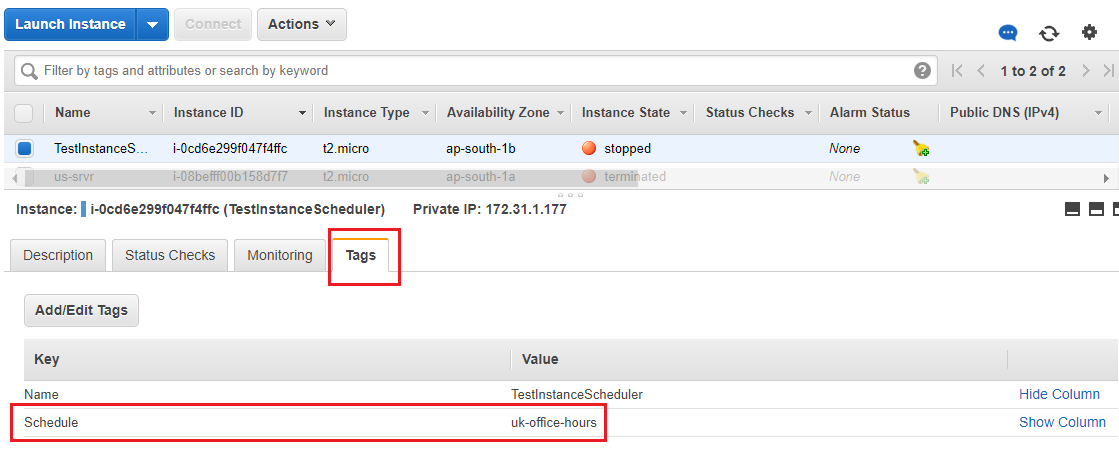
Now observe your EC2 instance based on the time settings & the Time Zone that you've selected. By default the Time Zone is UTC. If you've not made any changes in DynamoDB tables then the tagged EC2 instance should be in running state only between 9 AM to 5 PM from Monday to Friday. Apparently, in a week your instance will run only 1/3 of the time! 

To Change the Schedule / Time / Weekdays
  1. Go to the DynamoDB service.
  2. Select the (radio button) table named *-ConfigTable-*. 
  3. Select Items (right pane). 
  4. Select period with name office-hours.
  5. Make a change to begintime & endtime. Click Save.
You can play around by changing the various parameters in the ConfigTable. Feel free to share your observation in comments.

Happy Cloud Computing!


Tuesday, January 2, 2018

What & Why of "Serverless Computing" in Plain English

Guinea Pigs are NOT pigs & they are definitely NOT from the country named Guinea (they are rodents from South America!). Fireflies are NOT flies (they are rodents!). Arabic Numerals are NOT from Arabian Peninsula (they originated in India!). And French Fries are probably NOT from France! Historically, Indians were NOT actually from India for many centuries! Yes the term originally referred to indigenous Americans (a historical blunder). 

Similarly, Serverless doesn't mean absence of servers or no servers. So, is it simply one of the most popular tech-misnomers?

The term Serverless Computing was buzzing around throughout the year 2017. For the uninitiated amongst you, Serverless Computing is a gigantic shift in the way we approach Cloud Computing servers. As of now it's hot, trending and everyone in tech-circle loves talking about it. However, whether it's going to make into the mainstream usage in 2018 or will slide into oblivion, only time will tell. 

To understand Serverless we might need to understand a bit of history of evolution & usage of servers. Here we go.

👈Flashback

Hard Times - Until late 1990s 

I've heard that to procure a server in those days was a real pain in the neck. The server hardware, OS, networking, storage & provisioning etc. had a lead time of up to years! There were only dedicated servers. Again if you want to scale, the same long cycle should be repeated. No wonder, it could take years of budgeting & planning to setup servers. It was a luxury - sort of. To import a computer, it took me three years and I went about 50 times to Delhi 

Virtual Days - 2003 

Virtualization was an apparent evolution from dedicated servers. One physical machine can now support various operating systems. You can split a single physical server into multiple virtual machines. Here you were able to abstract the hardware. The on-premise virtualization lead to a simplified infrastructure management. The provisioning time & cost were reduced.

Cloud Magic - 2007 - Beginning of Cloud IaaS

IaaS was a new paradigm & it democratized the server usage. Now you can programmatically access / provision servers / storage network within minutes via API calls. Quickly provision your server & terminate it when you don't need them.  It empowered even the small & mid-sized companies, independent developers to build & deploy their applications in a state-of-the art infrastructure without much planning & most important, within a small budget. 

This lead to cost reduction, agility, reliability, scalability & elasticity (i.e. ability to grow or shrink on the fly). Unlike past when most of the tissue paper prototypes were forgotten due to initial server cost (CapEx) now many of them were actually build & shipped to the market. Boom ... beginning of the Startup era.

PaaS - 2008

PaaS like Google App Engine, MS Azure & AWS Elastic Beanstalk are designed to support the complete web application lifecycle viz. building, testing, deploying, managing & updating. So, PaaS was something which 'almost' abstracted the IaaS & additionaly provided the OS, Development tools, BI tools etc. Actually, this had the potential to change the we usually consumed infrastructure. 

But unfortunately it didn't click with end users. PaaS is almost dead. Vendor lock-in (no portability), choice of technology limited to what the vendor provided... more than enough reasons for failure?

The pioneers of PaaS like Google & Microsoft no longer emphasis on their respective flagship PaaS services & has subsequently evolved more as an IaaS provider.

Containers - Write-once Run any where - 2013

When you ship a software with docker (or any container) you package everything that is needed to run the software - code, runtime, libraries, tools & settings. In a nutshell - Containerized software will always run the same, regardless of the environment.

To a great extent, Containers (read Docker) removed the major issue of PaaS & i.e. portability. Containers abstracted the IaaS layers of various cloud providers. Write-once Run any where...move them around from cloud to cloud. In way this lead to a true independence between applications & infrastructure.

Scaling is provided by orchestration tools - Kubernetes, Docker Swarm, Mesos.

Note: Containers created on AWS ECS - are vendor locked-in i.e. they can't be run on other clouds. It is recommended to use Amazon EKS, (Amazon Elastic Container Service for Kubernetes) -- no vendor lock-in. Also watch-out for AWS Fargate in 2018 - support for Amazon EKS will be available soon.

Serverless / FaaS - 2014


Serverless completely abstracted the underlying details of cloud infrastructure. The servers are still there, however you no longer require to manage it. FaaS is the way to achieve Serverless. 

Serverless / FaaS got popularity after AWS Lambda launch in 2014. Other popular FaaS are Azure Functions, Google Compute Functions. The key difference between PaaS & FaaS is the way Scaling is handled. In PaaS you have to plan & define a Auto-Scaling strategy whereas in FaaS you just don't care about how/what's happening behind the scene - i.e. complete abstraction! More on this in an excellent article by Martin Fowler.

Basically a Function (in FaaS) spins-up servers with an event/trigger and cleans it up (the resources etc.) once the request/task is completed.

Summarizing the above Milestones 


Here all the above are still going strong and are in mainstream usage. However, now it seems, PaaS has lost a bit of popularity.

Why Serverless?
  1. No servers to manage - i.e. Zero-Administration.
  2. It's the real pay as you go. No need to pay for idle time.
  3. Cost effective - sub second billing.
Conclusion

Greenfield projects (i.e. a fresh project, which is not constrained by prior work), Microservices/Nanoservices architecture and a few tasks from brownfield projects can be tried with this new approach of consuming compute resources. As of now, there are a few best-fit-use-case-patterns to begin with Serverless/FaaS. My favorite being the use case where you require instant scaling for a brief amount of time. As auto-scaling couldn't serve this requirement because by the time auto-scaling responds & spins up new server the brief spike phase is already over!

Despite all the attractions for Serverless now, there are hiccups too like maturity of the tools / ecosystem around serverless. Also, writing stateless code could be a challenge. Go ahead & start experimenting with it as 2018 might see the serverless going mainstream.

Sunday, April 23, 2017

Palindrome - Hindi, Chinese, French, Spanish

Recently I realized that the code I shared for Palindrome here has a few limitations. It supports only ASCII character sets (i.e. mainly English alphabet & numbers). It won't support other language palindromes.

See the following palindrome examples from some other major languages:

        • été (French)
          •  दामाद (Hindi)
            • सरस (Hindi)
              • 不得不  (Chinese)
                • abañaba (Spanish)
                  • анилина (Russian)
                    • カジカ (Japanese)

If you input any of the above in our previous code you won't get a correct output. The characters in above examples such as é द 不  etc. are non ASCII and hence our previous code doesn't work.

Check the above palindromes with this new code in action.

Let us see how to overcome this limitation.

rune: Type rune is basically int32. It generally indicates a Unicode code point.

See the following revised code that works perfectly fine even with non-ASCII characters.
P.S. Reference: The code is adapted from The Go Programming Language (Donovan & Kernighan).


Saturday, August 27, 2016

Package Crypto - SHA256 Hash Algorithm Example

The Go package crypto/sha256 produces hexadecimal cryptographic hash (digest) of a message. You can play with the examples shared here and check the output in Go Playground (links shared below corresponding code snippets).

Let us see a working example:

Click to play with the above code

Here we've successfully encrypted "My secret message" using SHA256.
Things to note:

%X  is used to print elements of a Slice in hexadecimal, i.e. base 16 with upper-case letters for A-F)

Question
  • What happens if you replace %X with %x?
Let us see the next example where we're comparing the two outputs and printing true or false using %t :

Here the output is false. Why? It's simply because the two messages are different.

Click to play with the above code

Here's an excellent article about password encryption and security.


Wednesday, April 6, 2016

Go Channels for Absolute Beginners

Read Concurrency Parallelism and Goroutines for Beginners  before you proceed further.

CodeRef# 1

package main

import "fmt"

func main() {
 
      fmt.Println("A message from main function")
 
      go fmt.Println("A message from goroutine")
  
}


What do you think is the Output of above code?

A message from main function

Play with the Above Code

In most of the cases you would get the above output. But there can be cases where you may get both the messages as output. Here we can conclude that the output of the above code is undefined. 

Why didn't it always print the second message from the goroutine? 

The func main() here is running in a single OS execution thread. Once the main() code has finished writing "A message from main function"  it doesn't wait for the other subroutine (called using the keyword go) to finish its task.

A quick fix solution that can fix this issue is to introduce a delay in the main(). Something like:

 CodeRef# 2

package main

import "fmt"
import "time"

func main() {
 
      fmt.Println("A message from main function")
      go fmt.Println("A message from goroutine")
      time.Sleep(1 * time.Second) 
}


Output  CodeRef# 2


A message from main function
A message from goroutine

It seems we've achieved what we expected out of that code snippet. Right?

Though we've got the expected result it is a good example of bad programming. Time based synchronization must be avoided as they are inefficient and might lead to ugly bugs. You never know if the process will take 1 second (as introduced in the above example) or more or less than 1 second. Also, the time of execution may differ on different machine configuration. Avoid it!

CodeRef# 3

package main

import "fmt"
import "runtime"

func main() {
 
      fmt.Println("A message from main function")
      go fmt.Println("A message from goroutine")
      runtime.Gosched() 
}

Output  CodeRef# 3

A message from main function
A message from goroutine

Play with CodeRef# 3

This looks like a better solution. Here Gosched() has switched the execution context so that the other goroutine can finish its task. Gosched() yields the processor, allowing other goroutines to run.

What are Channels?

Goroutines run concurrently as independent units and hence there must be some mechanism to synchronize the access to shared memory. This is essential to prevent deadlock like scenarios. Go has Channels to sync goroutines. 

 The Little Go Book by Karl Seguin describes channels as:

You can think Channel as a communication pipe between goroutines which is used to pass data. In other words, A goroutine that has data can pass it to another goroutine via a channel. The result is that, at any point in time, only one goroutine has access to the data.

Remember, a channel can only transmit data-items of one datatype.

Type of Channels
  • Unbuffered or Synchronous
  • Buffered or Asynchronous
Declaring & Allocating Memory to Channels


                               intC := make(chan int)          //default capacity = 0
                               strC := make(chan string, 3) // non-zero capacity

Channel Supports 2 operations SEND and RECEIVE 

                               Channel <- Data                     // SEND 'data' to a channel
                               msg :- <- Channel                  //RECEIVE a message & Assign it to a variable msg

                               r := make(<-chan bool)          // can only read from
                               w := make(chan<- []os.FileInfo) // can only write to

Note: The left arrow operator <- is used for both sending & receiving data. The arrow head of the operator points in the direction of data flow. The channel SEND & RECEIVE operations are Atomic i.e. they always complete without any interruption. 

 CodeRef# 4

package main

import (
 "fmt"
 "time"
)

func main() {

 ch := make(chan int)

 go iSend(ch)
 go iReceive(ch)
 time.Sleep(time.Second * 1)
}

func iSend(ch chan int) {
 ch <- 1
 ch <- 3
 ch <- 5
 ch <- 7

}

func iReceive(ch chan int) {
 var info int
 // infinite for loop, executes till 'ch' is empty
 for {
  info = <-ch
  fmt.Printf("%d ", info)
 }
}

Output  CodeRef# 4


1 3 5 7 

Play with the Code

CodeRef# 5

1
 2
 3
 4
 5
 6
 7
 8
 9
10
11
12
13
14
15
16
17
18
19
20
21
22
23
package main

import "fmt"
import "time"

func main() {
 ch1 := make(chan int)
 go send(ch1)
 go receive(ch1)
 time.Sleep(time.Second * 1)
}

func send(ch chan int) {
 for i := 1; i < 7; i++ {
  ch <- i
 }
}

func receive(ch chan int) {
 for {
  fmt.Println(<-ch)
 }
}


Output  CodeRef# 5

1
2
3
4
5
6

Play the code here 


CodeRef# 6

 1
 2
 3
 4
 5
 6
 7
 8
 9
10
11
12
13
14
15
16
17
18
19
20
21
22
23
24
25
26
27
28
29
30
31
32
33
34
35
36
37
38
package main

import "fmt"
import "time"

func main() {
 ch := make(chan int)
 go sendOdd(ch)
 go sendEven(ch)
 go receive(ch)
 time.Sleep(time.Second * 1)
}

//This func to generate only Odd numbers
func sendOdd(ch chan int) {
 for i := 1; i < 9; i++ {
  if i%2 != 0 {
   ch <- i
  }
 }
}

//This func to generate only Even numbers
func sendEven(ch chan int) {
 for i := 1; i < 9; i++ {
  if i%2 == 0 {
   ch <- i
  }
 }
}

//Recive & Print numbers
func receive(ch chan int) {
 for {
  v := <-ch
  fmt.Println(v)
 }
}

Play with the Code

Output  CodeRef# 6

1
2
4
6
8
3
5
7


The above code is self explanatory. Play around and you'll soon get the knack of it. Please share your views to improve this article.

References

http://guzalexander.com/2013/12/06/golang-channels-tutorial.html


Sunday, February 7, 2016

Find Number of CPU Cores in Your Machine

How many CPU cores does your machine have? 

Here's a screenshot of my machine. It's showing 4 physical cores & 8 Logical Processors.


Why Cores are Important?


More cores are usually associated with better performance. From Go 1.5 onward, by default, Go programs run with GOMAXPROCS set to the number of cores available; in prior releases it defaulted to 1. This will definitely improve the performance of Go programs.


Here's the code to find out number of CPU cores/Logical Processors in your machine. The function NumCPU() returns the number of logical CPUs usable by the current process.


package main

import (
 "fmt"
 "runtime"
)

func main() {

 cores := runtime.NumCPU()

 fmt.Printf("This machine has %d CPU cores. \n", cores)

}

Saturday, January 30, 2016

Go Code to Find GCD / HCF of Two or More Integers


In mathematics, the greatest common divisor (GCD) of two or more integers, when at least one of them is not zero, is the largest positive integer that divides the numbers without a remainder.
                                                                                                                                  --- src: Wikipedia

For example, the GCD of 20 and 25 is 5.

The GCD is also known as the: 
      • Greatest common factor (GCF), 
      • Highest common factor (HCF), 
      • Greatest common measure (GCM), 
      • Highest common divisor (HCD)

Prerequisites to understand the following code:
Code follows:

package main

import "fmt"

func main() {

 var n int
 var num int
 var result int

 fmt.Println("How many integers GCD do you want to calculate?")
 fmt.Scanf("%d\n", &n)
 fmt.Println("Enter space separated integers:")
 numList := map[int]int{}

 for i := 1; i <= n; i++ {
  fmt.Scanf("%d", &num)
  numList[i] = num
 }
 //This is the result for only 2 integers
 result = gcd(numList[1], numList[2])

 //for loop in case there're more than 2 ints
 for j := 3; j <= n; j++ {
  result = gcd(result, numList[j])
 }

 fmt.Println("The GCD/HCF of given integers is: ", result)
}

//Func to implement Euclid Algo
func gcd(x, y int) int {
 for y != 0 {
  x, y = y, x%y
 }
 return x
}

Output


Play with the above code

Please share your feedback for improvement of this code.

Monday, January 25, 2016

Check if a String is Palindrome

The best way to learn a new computer language is by solving puzzles, games & code challenges. It's so much fun apart from the satisfaction you get once you crack them! Solving puzzles can push your language skills to the next level apart from improving your problem solving skills. From my experience I can tell you that in the beginning they're in fact a tough-nut-to-crack but once you persist enough to solve a few of them... it's kinda addictive! Start with the simple ones... and don't quit! 

For impatient learners who don't like preaching:

Play with the code and see the results in your browser - Once this page is open, click run and follow the instructions.

Another post that might interest you:


Tip - Take loads of break while solving puzzles. Sometimes you might need to take a break for a whole day so that you can reset your thoughts into a different direction. Also, if you've solved a puzzle in a single sitting, it's not a puzzle in the first place :) 

In this post we'll see how to find if an input string is a palindrome or not using Golang.

What is a Palindrome?

A palindrome is a word, phrase, number, or other sequence of characters which reads the same backward or forward.

Examples of Palindrome
      • Madam
      • Civic
      • Noon
      • Refer
      • Rotor
      • Level
      • Malayalam
      • 1230321
Problem# 1

Enter a string and find out if the string is a Palindrome or not.

Solution# 1


1
 2
 3
 4
 5
 6
 7
 8
 9
10
11
12
13
14
15
16
17
18
19
20
21
22
23
24
25
26
package main

import (
 "fmt"
 "strings"
)

func main() {

 var ip string
 fmt.Println("Enter string:")
 fmt.Scanf("%s\n", &ip)
 ip = strings.ToLower(ip)
 fmt.Println(isP(ip))
}
//Function to test if the string entered is a Palindrome
func isP(s string) string { mid := len(s) / 2 last := len(s) - 1 for i := 0; i < mid; i++ { if s[i] != s[last-i] { return "NO. It's not a Palimdrome." } } return "YES! You've entered a Palindrome" }


Now let us build an advanced version of the problem where we can see a practical usage of Slices.

Problem# 2

Enter fixed number of strings, each in a new line, and find out if they are palindrome or not.


Solution# 2

To understand this solution you must have working knowledge of Slices in Go Programming.


package main

import (
 "fmt"
 "strings"
)

func main() {
 var n int
 var ip string
 fmt.Println("How many strings you want to test?")
 fmt.Scanf("%d\n", &n)
 strSlice := make([]string, 0)
 for i := 0; i < n; i++ {

  fmt.Printf("Enter %d string\n", i+1)
  fmt.Scanf("%s\n", &ip)
  ip := strings.ToLower(ip)
  strSlice = append(strSlice, ip)
 }
 for _, v := range strSlice {
  fmt.Println(isP(v))
 }
}

//Function to test if the string entered is a Palindrome
func isP(s string) string {

 mid := len(s) / 2
 last := len(s) - 1
 for i := 0; i < mid; i++ {
  if s[i] != s[last-i] {
   return "NO. " + s + " is Not a Palindrome"
  }
 }
 return "YES. " + s + " is a Palindrome"
}

Output# 2


Play with the above code

Exercise

If you find this interesting you can improve this code:

  1. To take care of the null/empty input strings.
  2. To return appropriate message if number of strings to test is entered zero.

Friday, October 16, 2015

Concurrency Parallelism and Goroutines for Beginners

In the world around us many un/planned activities/events simultaneously and often independent of each other.  While reading this, you may receive a phone call and while still on the call you might receive  a few push notifications on your mobile from Facebook or WhatsApp. While reading this and attending to that phone call, you might be listening to your favorite number played in your home theater and you may reach out to adjust the volume level. Does this make sense or you're still scratching your head... yet another activity! 

Yes, the world is indeed parallel. Apart from everything else even in technology world also the concept of parallelism can be observed viz. Multicore machines, networks, clouds of CPUs, Users request to a web server - all are parallel.

That's probably the reason we get stuck at times when we try to solve a real world problem using the non parallel approach (read Object Oriented techniques).

Almost a decade back the following was one of the pet interview questions thrown mostly to any developer with 3+ years of experience:
  •  Have you implemented multi-threading in x language? 
Where x = C#, Java or any other language that supports multi-threading.

Without any doubt, I agree (like most of us) that multi-threading is complex and a beast too big to be tamed by mere mortals with average intelligence. You can agree to disagree with me and may call this a common fallacy :-)
  • Goroutines has made concurrency / multi-threading easier to use.
If you already understand the basics move on to Go Channels

What is Concurrency?

Concurrent = happening, or done at the same time

Concurrency is a way to structure a program by breaking it into pieces that can be executed independently.

The Go tools of concurrency make it almost trivial to build a safe, working, scalable & parallel design.

Here, Processes in the general sense, not Windows/Linux processes.

Is Concurrency same as Parallelism?

No. They are not same, but are related.

Rob Pike says:
  • Concurrency is about dealing with lots of things at once.
  • Parallelism is about doing lots of things at once.
  • Concurrency is about structure, parallelism is about execution.
  • Concurrency provides a way to structure a solution to solve a problem that may (but not necessarily) be parallelizable.
Here's an excellent video by none other than one of the creators of Go - Rob Pike Concurrency Is Not Parallelism

Go tools to Implement Concurrency
  • Goroutines - concurrent execution.
  • Channels - synchronization and messaging.
  • Select - multi-way concurrent control.
What is Goroutine?

A goroutine is a function running independently in the same address space as other goroutines. They're a bit like threads, but they're much cheaper.

A goroutine is a lightweight thread of execution. It's routine to create thousands of goroutines in one program. Stacks start small, but grow and shrink as required.
Goroutines aren't free, but they're very cheap.

Important Update: To synchronize concurrently running functions Go provides Channels.

The following code sample uses time.Sleep() to sync the goroutines - a bad programming practice and should be avoided. Synchronizing your goroutines like this can introduce several serious bugs in your code. The purpose of this code sample is to give you a feel of goroutines in action.

Example Code

Play with the code


package main

import (
 "fmt"
 "time"
)

func Tortoise() {

 time.Sleep(5 * 1e9)
 fmt.Println("Tortoise is still somewhere near the Starting Line.")
 time.Sleep(10 * 1e9)
 fmt.Println("Tortoise reaches 10 miles after 10 sec.")
 time.Sleep(10 * 1e9)
 fmt.Println("Tortoise reaches 20 miles after 20 sec.")
 time.Sleep(6 * 1e9)
 fmt.Println("Surprise... Tortoise reaches finish line! Completes 26 miles in 26 sec")
}

func Rabbit() {
time.Sleep(2 * 1e9)
 fmt.Println("Rabbit reaches 10 miles after 2 sec.")
 time.Sleep(4 * 1e9)
 fmt.Println("Rabbit reaches 20 miles after 4 sec.")
 time.Sleep(7 * 1e9)
 fmt.Println("Rabbit takes power nap.")
 time.Sleep(20 * 1e9)
 fmt.Println("Rabbit reaches the finishing line! OOOPs Rabbit lost the race!")
}

func main() {

 fmt.Println("Marathon Race - 26 miles, Tortoise vs. Rabbit.")
 fmt.Println("On your mark. Starting pistol fired...")
 fmt.Println("The Rabbit sprints ahead while the Tortoise is dead slow.")
 go Rabbit()
 go Tortoise()
 time.Sleep(34 * 1e9)
 fmt.Println("Keep GO-ing :-) even if you're slow.")
}


Output

Marathon Race - 26 miles, Tortoise vs. Rabbit.
On your mark. Starting pistol fired...
The Rabbit sprints ahead while the Tortoise is dead slow.
Rabbit reaches 10 miles after 2 sec.
Tortoise is still somewhere near the Starting Line.
Rabbit reaches 20 miles after 4 sec.
Rabbit takes power nap.
Tortoise reaches 10 miles after 10 sec.
Tortoise reaches 20 miles after 20 sec.
Surprise... Tortoise reaches finish line! Completes 26 miles in 26 sec
Rabbit reaches the finishing line! OOOPs Rabbit lost the race!
Keep GO-ing :-) even if you're slow

A Brief Description of Above Code

time.Sleep(5 * 1e9)


In above code we're introducing a time delay of 5 seconds. Replace 5 with 10 to get a delay of 10 seconds. Know more about Sleep function here.

Apart from the main() function there are other 2 functions namely Tortoise() and Rabbit().

In the main() function we've 2 goroutines namely go Rabbit() and go Tortoise().
From the output you can easily see how both the functions are getting executed concurrently.

Important: By default, Go code is NOT parallel i.e. only a single core or processor is dedicated to a Go-program, regardless of how many goroutines are started in it; so these goroutines are running concurrent, they are not running in parallel: only one goroutine is running at a time.


How can I improve this code? Please share your thoughts.

Monday, October 5, 2015

Go Interfaces for Absolute Beginners

The concept of Interfaces and its practical implementation may be rather daunting for beginners. It may require immense time and patience to assimilate the idea of interfaces.

Interfaces are an abstraction that helps you to achieve the following objectives with your code:

                  1. Clean & readable.
                  2. Scalable.

An interface defines a set of methods without any implementation code. So, an interface is simply an abstraction and can't contain any variables or code.


Declaration format of interfaces:

type Logger interface {
            method1 (param list) return type
            method1 (param list) return type
}

As per the official recommendation:
  • In the above format, Logger is the name of interface. It is idiomatic in Go to suffix the name of interface with er in most of the cases. There are exceptions but a common practice for naming an interface is: 
        • method name + er
  • Interfaces with one or two methods are common in Go code. More than three methods in an Interface is not considered idiomatic.
  • A type can implement multiple interfaces. Interface can be implemented by any type. But an interface can't implement itself.
  • Multiple types can implement the same interface.
  • Like many other languages, in Go also, we must implement all the methods in the interface.


Here's a code snippet (Code Ref# 1) that finds the area of a rectangle and triangle using functions. The same exercise is refactored in Code Ref#2 using structs, methods and interfaces.

Code Ref# 1. Play Here


package main

import "fmt"

func AreaRectangle(l, w int) int {

 return l * w
}

func AreaTriangle(b, h int) int {

 return (b * h) / 2 //Area of a triangle is (base*height)/2
}

func main() {

 fmt.Println("Area of Rectangle:", AreaRectangle(3, 4))
 fmt.Println("Area of Triangle:", AreaTriangle(5, 20))

}

Output

Area of Rectangle: 12
Area of Triangle: 50

Code Ref# 2. Play Here

package main

import "fmt"

type Rectangle struct {
 width, height int
}

type Triangle struct {
 base, height int
}
type Shaper interface {
 Area() int
}
// You must implement all the methods in the interface
func (s Rectangle) Area() int {
 return s.width * s.height
}
func (t Triangle) Area() int {
 return (t.base * t.height) / 2
}
// Variable declared as an interface type can call methods that are in the named interface.
// Generic 'measure' function that works on any Shape.

func measure(s Shaper) {
 fmt.Println(s)
 fmt.Println(s.Area())
}
func main() {
 s := Rectangle{width: 3, height: 4}
 t := Triangle{base: 5, height: 20}
// The Rectangle struct type implements the 'Shaper' interface so we can use instances 
// of these structs as arguments to measure.
 measure(s)
 measure(t)
}


Output


{3 4}
12
{5 20}
50
P.S. Interfaces are a bit difficult to understand. A beginner must persist with it, practice as many examples as possible to understand and assimilate the concept. I'll review this post every now and then and may add a few more code samples.